Best ModPE Mods for Minecraft PE & Bedrock
Browse and download ModPE Mods for Minecraft Pocket Edition & Bedrock on iOS, Android, and PC, or customize with MCPE Studio.
 .mcpack
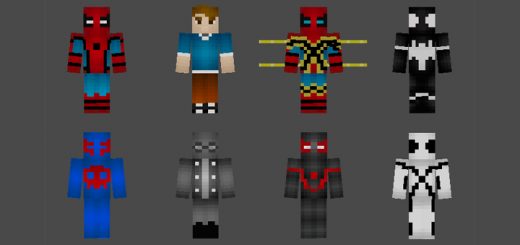
Spider-Man Suits Skin Pack
This pack adds some of the most popular Marvel Spider-Man superheroes (and villains) to Minecraft: Bedrock Edition. It also includes a skin with extra arms (3D model) which is based on the Iron Spider character in the Avengers: Infinity War movie. The skins included are Spider-Man, Unmasked Peter Parker, 2099, Black Suit, Iron Spider 3D, Spider-Man Noir, Future Foundation and Miles Morales.
 .mcpack
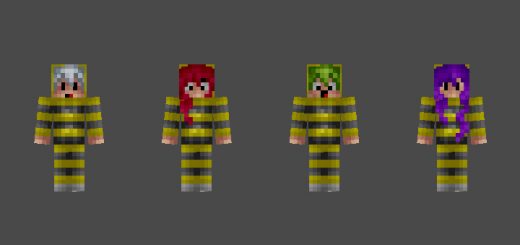
SG Battle Bees Skin Pack
The first installment of SkyGames Skin Mashups! Enjoy 4 bee skins and the new Battle Bees Minigame Map! Expect more skin packs matching with our minigames in the future.
 .mcaddon
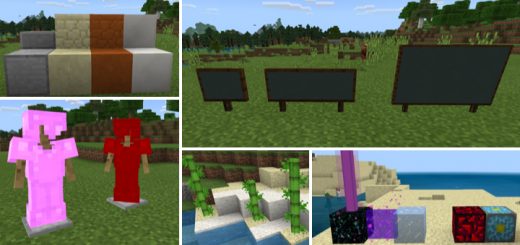
Better Vanilla Addon
This addon adds features that should be part of vanilla Minecraft, but isn't. There are also lots of blocks that are not even accessible in creative, but you can obtain them using this addon. There is also a slider you can use for changing the color of enchanted items. Trade a Cleric (villager) to receive Barrier Blocks, and then use those to trade with a Toolsmith to get Invisible Bedrock which is an indestructible block even in creative mode.
 .mcpack
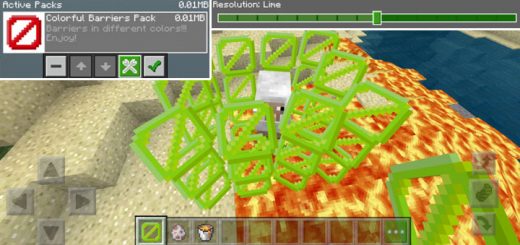
Colored Barriers Resource Pack (Beta Only)
The Barrier is an indestructible block (for all gamemodes except creative) which you can use for building invisible walls. It's already an existing feature in Java Edition, but is first now being added in the Bedrock Edition beta. This is a resource pack which lets you change the color of the barrier block and choose between 16 different colors.How does it work?The first thing you will need to do is to enable the resource pack in Global Resources. Then click the wrench icon and use the slider to select a color.You can obtain the barrier block by typing the following text command in-game (preferably while in creative mode): /give @s barrierThe default color for the barrier block is red, but by using this texture pack we were able to change it to green. To change the color once more you need to exit the world and use the slider option in Global Resources to select a new color. The barrier block is very useful when building maps as it can be used for creating invisible (and if in survival or adventure mode indestructible) walls.
 .mcpack
Earthrise (for Moonscape) Resource Pack
This texture has been created specifically to work with the Moonscape build, but it will work equally well with other Space themed builds. It has always been a little strange having the Moon rise over this build, so this resource pack will fix that. The resource pack replaces the Moon texture image with an image of Earth which helps give the entire build more realismIt's clearly mainly just going to look good on builds where you're trying to emulate a moon environment.
 .mcaddon
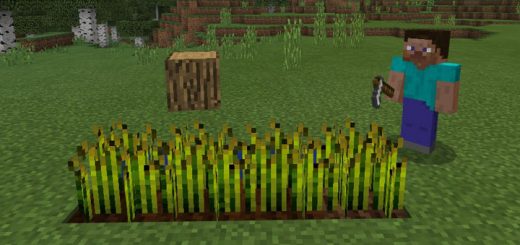
Minecraft Block Heads Addon
This add-on transforms some of the existing heads and skulls into different wearable Minecraft blocks. it's a quite fun idea which could be used for pranking other players or to create some fun hide-and-seek minigame. Also, when you wear any of the blocks you will also turn invisible which makes it the perfect disguise in Minecraft!How does it work?Equip one of the Minecraft heads or skulls which are replaced by block models. As soon as you're wearing one of the heads you will also turn invisible so that only the block model is visibleThe current block heads are Oak Wood Planks, Cobblestone, Grass Block and Oak Log Block. They replace some of the skulls and heads in-game. Wear the item as a helmet to get it to work. You'll automatically get an invisibility status effect while wearing a block.Terms of UseBy using this addon or any of my creations, you agree to the following terms of use listed here. You should be aware that stealing other people’s content online is a crime. This also happens to addons too.You cannot redistribute or re-publish this addon or any of my creations to any site / place without me being credited, without asking any permission to me, and without the original source where you got this addon ( mcpedl.com ).You do not have the right to rename and edit this addon or any of my creations. Then, claim it as yours and upload or share the edited version into your site.You are not allowed to create your own direct download link for your websites, videos, and etc. It must be redirected to the original website of the addon ( mcpedl.com ).
 .mcpack
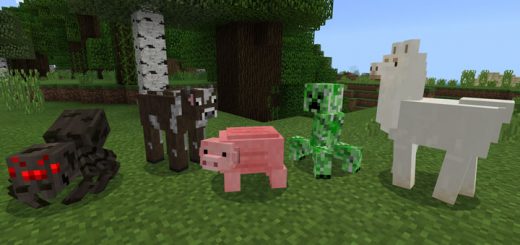
Realistic Mobs Resource Pack
This resource pack adds new models for most of the mobs in-game. The main idea for this pack is to offer an alternative set of models which are more detailed and realistic. All mobs still have a blocky design, so it stays true to the original design. Overall, it's a very neat pack with some great details!
 .mcpack
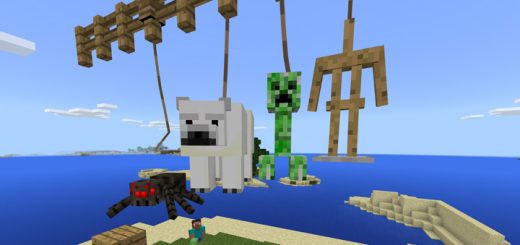
Leash+ Addon
This add-on adds more mobs which you can leash by using the lead. By default it's limited just passive mobs, but this is great if you want the use for lead to extent to also hostile mobs or passive mobs which previously wasn't included. For example, it's very useful if you are building a mob farm and need a way to move easily move mobs from one location to another without commands or similar cheats.How does it work?Here is a list of all new entities which you can leash. Sheep, pigs or any other vanilla mobs are still possible to leash even though they aren't included in the list.Armor StandCreeperEndermanParrotPolar BearSkeletonSlimeSpiderVillagerZombieZombie VilagerZombie PigmanAnd more!
 .mcaddon
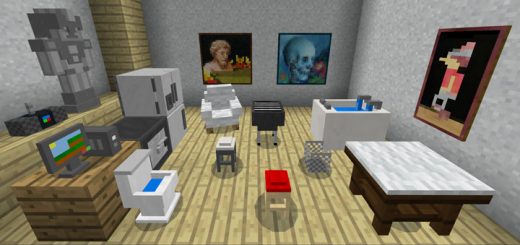
Mine-Furniture Addon
This is a really great addon which includes 20+ different furniture. Each furniture has a different use such as sitting or some kind of interaction (e.g. storage or trading). For example, the radio can be used for playing songs and the fridge can be used for storing food items. But the main and most important part is the fact that they look really good and can also be used just as decorations for your buildsHow to obtain furniture?You can now trade Furniture Items by finding or spawning a Villager and interact it with a Bit-Emerald to spawn a Furniture Seller.How to use the DL Box for spawning furniture?Place down a DL Box and then use any of the furniture items to build the furniture (long press on the box). The DL Box replaces the shulker and that means you will need to use get a shulker spawn egg (or type /summon shulker) to spawn it. Some furniture also replace blocks, so those you can find by using the creative inventory. You can find a full list of furniture further down on this page. In this case, I built a radio. Different furniture have different features. The radio can be used for playing a song but you'll need a CD for that.iOS / Android: Hold a Rock Song CD, long press on the radio and press PlayWindows 10: Hold a Rock Song CD and right-click on the radio to play a songAll FurnitureMost of the following furniture have unique features but they are also great just to use as decorations. Some of the furniture can be rotated.DLBox (Undyed Shulker) – Unboxes the furniture which you want to getDrum (Purple Shulker) – You can play this Drum by long pressing on it with a stickComputer (Black Shulker) – Turn it on so you can store your written and enchanted books (With 3 Slots only), and by turning it off, you need to use some Bit-Emerald by interacting to the computer. You can earn emeralds every 5 to 6 Minutes.+Statue (White Shulker) – You can upgrade it into a Statue Guard by long pressing with Golden Pickaxe, and Trophy Statue by long pressing with Stone PickaxeRadio (Red Shulker) – You can play songs by using the CDs (Pop, Rock, Blues Songs)Table (Orange Shulker) – You can store 2 Food Items, drop items on table, then long press on it to access the itemsChair (Yellow Shulker) – Sittable, and can change size by long pressing on it with Golden Pickaxe. You can change it back by long pressing with a ChairFridge (Green Shulker) – Store food itemsCoffee Table (Lime Shulker) – You can store 2 Food Items, drop items on table, then long press on it to access the items. You can change the size by long pressing on it with Golden Pickaxe. You can change it back by long pressing with a Coffee Table ItemStool (Blue Shulker) – Sittable, and can change size by long pressing on it with Golden Pickaxe. You can change it back by long pressing a StoolBlender (Cyan Shulker) – Blend apples, melons, potatoes and carrots into potionsBBQ Grill (Light Blue Shulker) – Need to Put one Block of Coal to Cook your raw meat and fishesSafe / Vault (Magenta Shulker) – Can be use to hide your important items. You can also lock/unlock this using a Safe Card.Bin (Pink Shulker) – Drop your items in the bin. You can collect them by long pressing on it.Bathtub (Gray Shulker) – You can sit in the bathtub. But first you need to fill it up with some water. Use some soap (Light Gray Dye) to add some water and then have a seat. You can empty the bathtub by long pressing on it with an empty bucket.Toilet (Brown Shulker) – SittableFlat-Screen TV, Telephone, Mailbox, Aircon, Teddy Bear (Heads) – DesignElectric Fan (Dragon Head) – You can turn it on by placing a lever on it.Improved Beds (Normal Beds)Baby Cribs (Brown and Magenta Beds)The sheep is replaced by an armchair. You can rotate it by using a stick. You can also dye them with dyes.All Furniture ItemsThese are items which you can use to interact with furniture (e.g. repairing or CDs for playing music). The list also includes some wearable items.Snorkel (Chain Helmet) - Can be use to breath and can see underwater.Amulet (Chain Chestplate) - Can be use to have unlimited regeneration and strength.Magical Diaper (Chain Leggings) - Can be use to turn into a baby size. (The skin is custom though.)Slime Boots (Chain Boots) - Can be use to jump high and no fall damage.You can only the items to a Furniture Seller (Villager Priest) or using the command "/give @p Item ID 64 Data" (For example: /give @p yellow_flower 64 1) in the Following Items:Blues CD (yellow_flower:1) - Interact to the Radio to play Blues SongsPop CD (yellow_flower:2) - Interact to the Radio to play Pop SongsRock CD (yellow_flower:3) - Interact to the Radio to play Blues SongsFurniture Remover (yellow_flower:4) - Can be use to remove Furniture InstantlySafe Card (yellow_flower:5) - Can be use to Lock/Unlock SafeRed Gift (yellow_flower:6) - Can be use to obtain Equipment items!Blue Gift (yellow_flower:7) - Can be use to obtain Food items!Tip: Don't equip the gifts if you don't want to open yet, it will open them once you equip it. Sometimes, you will get coal inside those gifts.Furniture Repairer (yellow_flower:8) - Can be use to Repair/Heal FurnitureHedge (Nether Reactor Core) - Decoration and great for using as a wall.Lava Lamp (Glowing Obsidian) - Can be use as a Light Source and great for Decoration.Barrels (Shulker Boxes) - Can be use to store items.Wear Magic Diapers to turn into a baby! (The skin is custom though.)
 .mcpack
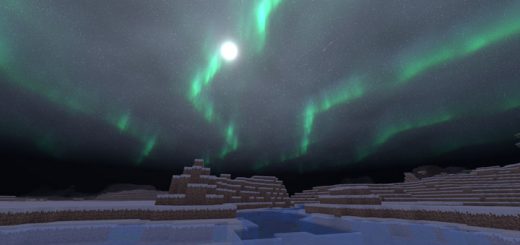
Tint Shader (Windows 10)
Tint Shader is adds beautiful new skies, shadows and lighting to Minecraft: Bedrock Edition. Due to certain limitations it's currently only available for Windows 10 (PC) users. During the night the sky is lit up by amazing northern lights. Not only does these shaders make the world more realistic but it also adds another whole new quality of exploration to the game as everything is more beautiful to explore.