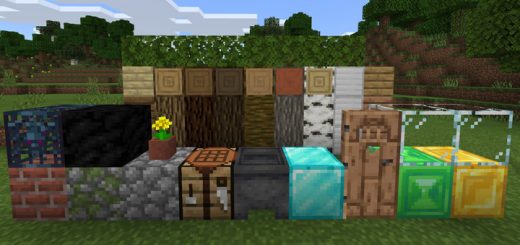
Pack Specifications
| Category | Mods → ModPE |
|---|---|
| File Format | .MCPACK |
| Supported Devices | iPhone, iPad (iOS), Android, Windows 10/11 |
| Minecraft Version | Bedrock / Pocket Edition 1.20 – 1.21+ |
How to Install New Default [16x16]
- Download the .MCPACK pack file directly onto your iPhone, iPad, Android, or Windows device.
- Tap the downloaded file and choose Open in Minecraft (on iOS, use the built-in Files app).
- Create or edit a world and activate both the Behavior Pack and Resource Pack in World Settings.
New Default [16x16]
Ready for iPhone, iPad, Android & Windows Bedrock. Instant direct download + unlimited access to our AI Skin & Addon Studio.
Customize Similar in AI Studio- Verified .MCPACK direct file download
- Unlock every mod, skin, map & AI generator
- 3-day free trial · Cancel anytime in 1 click
Frequently Asked Questions
Is New Default [16x16] compatible with iPhone, iPad, and Android MCPE?
Yes. New Default [16x16] is packaged in .MCPACK format for Minecraft Bedrock / Pocket Edition across iOS (iPhone & iPad), Android, and Windows 10/11.
How do I install New Default [16x16] in Minecraft?
Download the .MCPACK file, tap it in Files (iOS) or Downloads (Android), choose Open in Minecraft, and enable the pack in your World Settings.
Can I customize New Default [16x16] or create similar designs?
Yes. Use our AI Skin & Addon Studio to generate matching custom skins, bosses, or weapons inspired by New Default [16x16] in seconds.
More ModPE Mods
View all →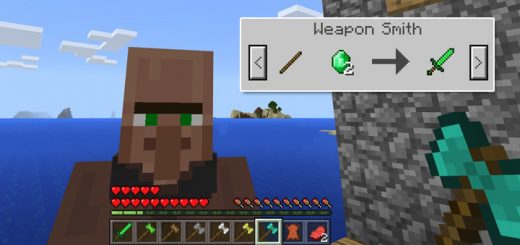 .mcaddon
More Weapons Addon
This add-on implements five new Battleaxes and one new Emerald Sword. All of the new weapons are literally add-ons as they don't replace any of the existing items in-game. They are also entirely different from ordinary Minecraft weapons as they give players new powers when using them. Upgrade your arsenal of weapons today!How to obtain the new weapons?All weapons are sold by a new merchant known as the Weapon Smith. (Transform any villager into a Weapon Smith by using an Iron Ingot to interact with a villager.) You will have to do some trading with him in order for him to unlock more trades. However, you could also use the following text command in-game to obtain the new weapons: /give @s yellow_flower 1 [1-7]There is one new sword and six new battleaxes. Each new weapon will give the player a new power while being wielded. You can find a full list of the weapon features further down on this page.The More Weapons Add-on makes fighting so much more enjoyable. All weapons have different abilities, but none of them are overpowered as they have been balanced to also include some disadvantages (such as decreased walking speed for weapons which would be heavier in real life).Weapon FeaturesEmerald SwordDamage: 5Increased speedEmerald BattleaxeDamage: 6Increased health (+3 hearts)Walks slightly slowerWooden BattleaxeDamage: 5Increased health (+1 hearts)Walks slowerStone BattleaxeDamage: 6Increased health (+2 hearts)Walks slowerIron BattleaxeDamage: 7Increased health (+3 hearts)Walks slowerGold BattleaxeDamage: 5Increased health (+2 hearts)Walks slowerDiamond BattleaxeDamage: 8Increased health (+5 hearts)Walks slower
 .mcpack
SG Plushies Addon
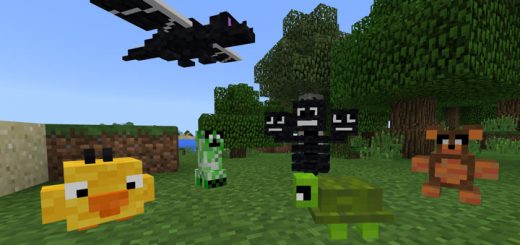
This resource pack replaces some of the skulls and heads in-game with different kinds of plushies. Currently there are five different plushies but more will likely be added in the future. All of them are actually things which you can get on the SkyGames Fan Realms. They are meant to be used as decorations, but you can also wear them like helmets.All PlushiesCreeper PlushieBear PlushieTurtle PlushieDragon PlushieWither PlushieDucky PlushieMore coming soon!
 .mcpack
Better Enchantment Names Resource Pack
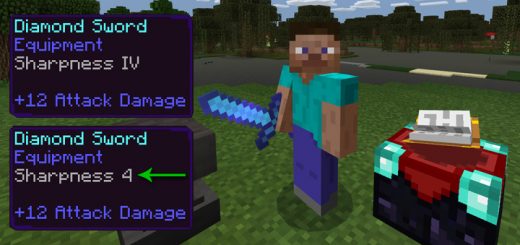
This is a resource pack which changes the Roman numbers for enchanted items with regular numbers (also known as Hindu-Arabic numerals). Here is an example: Sharpness IV = Sharpness 4 and so on. You can use this texture pack with three different languages (English (US), English (UK) and Spanish). It's a really simple addition, but could be useful for those who rather use the Hindu-Arabic numerals.How does it work?fter you've enabled the resource pack in-game you will have to access the language settings and enable the correct language selection.As soon as that's done all Roman numerals will be replaced by the Hindu-Arabic numerals.
 .mcpack
ADA Connected Glass Resource Pack [64x64]
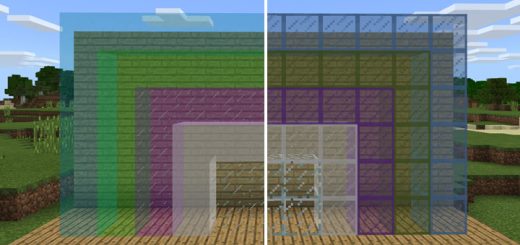
This resource pack adds high-resolution textures which remove the frame for the glass textures. The result is glass which looks as if it is connected as there are no outer borders disconnecting the blocks. It's really cool and useful if you want a more modern and simplistic design for your glass textures in-game.