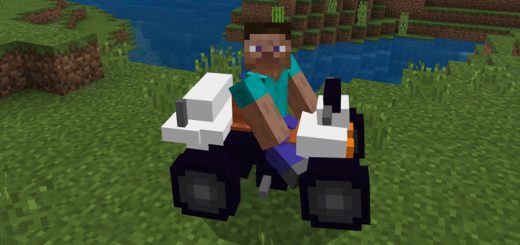
Pack Specifications
| Category | Mods → MCPACK |
|---|---|
| File Format | .MCADDON |
| Supported Devices | iPhone, iPad (iOS), Android, Windows 10/11 |
| Minecraft Version | Bedrock / Pocket Edition 1.20 – 1.21+ |
How to Install Quad Bike (All Terrain Vehicle) Add-on
- Download the .MCADDON pack file directly onto your iPhone, iPad, Android, or Windows device.
- Tap the downloaded file and choose Open in Minecraft (on iOS, use the built-in Files app).
- Create or edit a world and activate both the Behavior Pack and Resource Pack in World Settings.
Quad Bike (All Terrain Vehicle) Add-on
Ready for iPhone, iPad, Android & Windows Bedrock. Instant direct download + unlimited access to our AI Skin & Addon Studio.
Customize Similar in AI Studio- Verified .MCADDON direct file download
- Unlock every mod, skin, map & AI generator
- 3-day free trial · Cancel anytime in 1 click
Frequently Asked Questions
Is Quad Bike (All Terrain Vehicle) Add-on compatible with iPhone, iPad, and Android MCPE?
Yes. Quad Bike (All Terrain Vehicle) Add-on is packaged in .MCADDON format for Minecraft Bedrock / Pocket Edition across iOS (iPhone & iPad), Android, and Windows 10/11.
How do I install Quad Bike (All Terrain Vehicle) Add-on in Minecraft?
Download the .MCADDON file, tap it in Files (iOS) or Downloads (Android), choose Open in Minecraft, and enable the pack in your World Settings.
Can I customize Quad Bike (All Terrain Vehicle) Add-on or create similar designs?
Yes. Use our AI Skin & Addon Studio to generate matching custom skins, bosses, or weapons inspired by Quad Bike (All Terrain Vehicle) Add-on in seconds.
More MCPACK Mods
View all →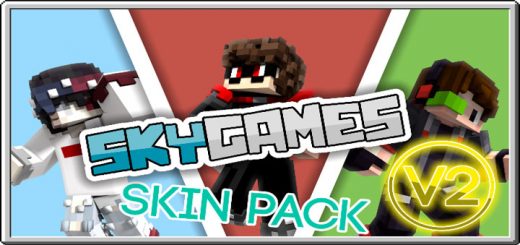 .mcpack
SG Staff Skin Pack
The SG Staff Skin Pack! A pack jammed full of SG goodness and skins. Become your favorite creator with an awesome and glowing cape. Make sure that Traswen is your favorite ;D Have fun Cloudies!
 .mcpack
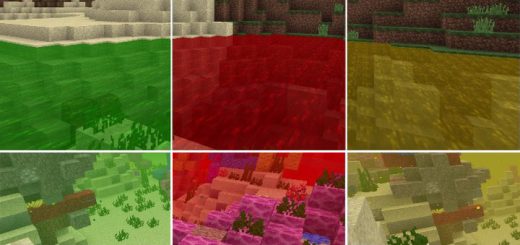
ColoredWater Texture Pack
The ColoredWater Texture Pack exists as three different versions (for three different colors). The colors included are lime, yellow and red. By enabling any of the packs you will change the water textures, particles and all other water related items into the color for that texture pack. Some colors might not be what you expected, but improvements will be done for future updates, as well as adding more colors.
 .mcpack
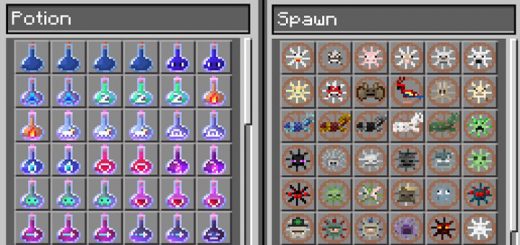
Symbol Resource Pack
This resource pack includes a complete set of new icons for potion flasks and spawn eggs. The redesign is a great upgrade from the original textures as it's much easier to understand the use for each item. For example, all spawns eggs now have an icon which specifically demonstrates the physical shape of each mob. And the potion flasks are designed to more logically display their uses.Here you can see some of the item icons which have been redesigned. It covers all of the potion flasks and spawn eggs.
 .mcaddon
Throwing TNT & Dynamite Addon
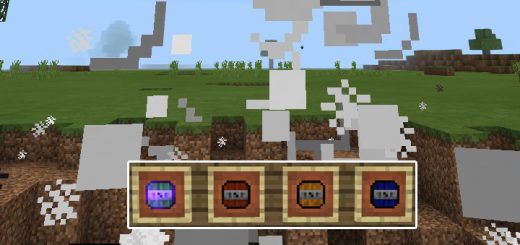
This add-on implements four new throwable explosive items and a new villager type to the game. It's a great add-on if you like to blow things up or need an easier way to modify/terraform the terrain. Each new item has a different explosion effect and each of them also function a bit different in terms of how you're using it.How does it work?You can obtain the new items by accessing the inventory while in creative mode. As all of them replace vanilla items you can also obtain them in survival mode, but then in less obvious ways.Dynamite (Egg)Dynamite x1.5 (Ender Pearl)Dynamite x2 (Bottle 'o Enchantment)Throwable TNT (Snowball)